
sprint 卡 · 记下需求
走完一个 AIT 任务
一个需求,走到真正完成的 Task。
看 AIT 开启隔离工作区、验证一个小修改,再把完成的结果带回原始项目。
阅读完整命令记录
AIT first-task command recording — 2026-09-07
Actual command output. Absolute example roots are shortened to ~/ait-first-task.
The replay is edited for readability; playback is not an execution-time measurement.

Working directory: ~/ait-first-task
$ ait --version
ait 1.1.2
Exit code: 0

Working directory: ~/ait-first-task
$ node --test tests/baseline.test.mjs
✔ task titles preserve the input order and data (1.168458ms)
✔ the existing board title is unchanged (0.063583ms)
✔ the existing priorities are unchanged (0.046333ms)
ℹ tests 3
ℹ suites 0
ℹ pass 3
ℹ fail 0
ℹ cancelled 0
ℹ skipped 0
ℹ todo 0
ℹ duration_ms 63.568458
Exit code: 0

Working directory: ~/ait-first-task
$ ait init
Initialized empty AIT repository in ~/ait-first-task/.ait (plan=zh-Hant-TW/concise)
Exit code: 0

Working directory: ~/ait-first-task
$ ait config set --user-name 'AIT Demo'
ait config set
user-name: AIT Demo
Exit code: 0

Working directory: ~/ait-first-task
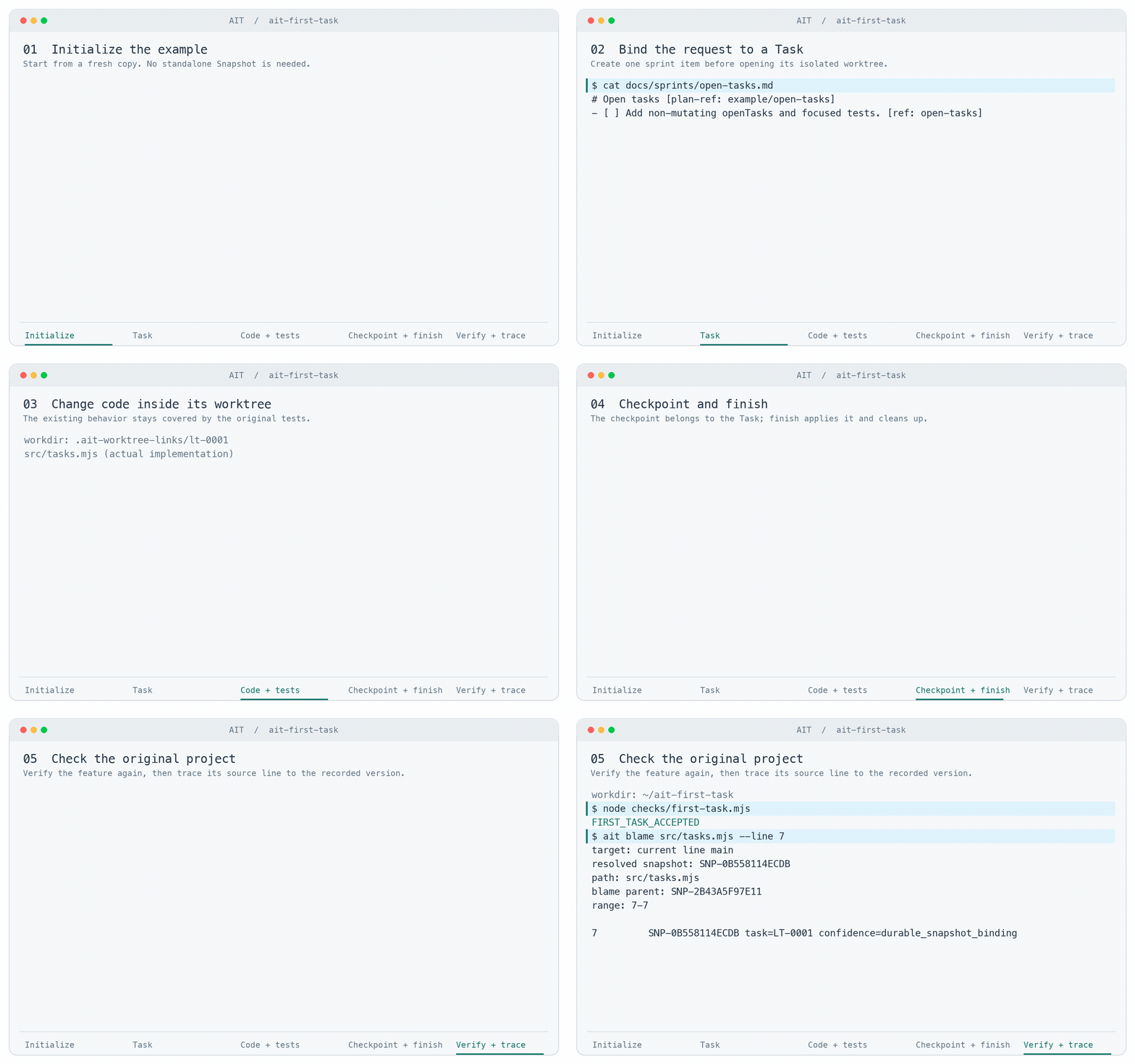
$ cat docs/sprints/open-tasks.md
# Open tasks [plan-ref: example/open-tasks]

## Intent
Add openTasks(tasks) to src/tasks.mjs. Return a new array of tasks whose done property is not true, preserving order and object references without mutating the input. Keep taskTitles unchanged.

## Constraints
Only edit this Task worktree. Do not edit checks/, remove tests, or add packages. The root agent executes this task without subagents.

## Acceptance
Add a focused regression test for done true, false, missing, empty input, preserved order and identity. Run node --test tests/*.test.mjs and node checks/first-task.mjs before Task finish; verify acceptance again in the original directory afterward.

- [ ] Add non-mutating openTasks and focused tests. [ref: open-tasks]
Exit code: 0

Working directory: ~/ait-first-task
$ ait task start --from 'docs/sprints/open-tasks.md#open-tasks' --intent 'Add openTasks without mutating input'
ait task start
task: LT-0001
title: Add non-mutating openTasks and focused tests
next: cd ~/ait-first-task/.ait-worktree-links/lt-0001
Exit code: 0

Working directory: ~/ait-first-task/.ait-worktree-links/lt-0001
$ node --test tests/baseline.test.mjs tests/open-tasks.test.mjs
✔ task titles preserve the input order and data (1.041042ms)
✔ the existing board title is unchanged (0.053041ms)
✔ the existing priorities are unchanged (0.048583ms)
✔ openTasks returns unfinished tasks without changing input or objects (1.224417ms)
ℹ tests 4
ℹ suites 0
ℹ pass 4
ℹ fail 0
ℹ cancelled 0
ℹ skipped 0
ℹ todo 0
ℹ duration_ms 63.11
Exit code: 0

Working directory: ~/ait-first-task/.ait-worktree-links/lt-0001
$ node checks/first-task.mjs
FIRST_TASK_ACCEPTED
Exit code: 0

Working directory: ~/ait-first-task/.ait-worktree-links/lt-0001
$ ait snapshot create LT-0001 --message 'Add non-mutating openTasks'
ait snapshot create
snapshot_id: SNP-0B558114ECDB
task_id: LT-0001
line_name: feature/lt-0001
parent_snapshot_id: SNP-2B43A5F97E11
message: Add non-mutating openTasks
Exit code: 0

Working directory: ~/ait-first-task/.ait-worktree-links/lt-0001
$ ait task finish LT-0001 --local
finished: LT-0001 -> main @ SNP-0B558114ECDB
closed: task, worktree, line, sprint
title: Add non-mutating openTasks and focused tests
Exit code: 0

Working directory: ~/ait-first-task
$ node --test tests/baseline.test.mjs tests/open-tasks.test.mjs
✔ task titles preserve the input order and data (0.987959ms)
✔ the existing board title is unchanged (0.050417ms)
✔ the existing priorities are unchanged (0.042292ms)
✔ openTasks returns unfinished tasks without changing input or objects (0.963875ms)
ℹ tests 4
ℹ suites 0
ℹ pass 4
ℹ fail 0
ℹ cancelled 0
ℹ skipped 0
ℹ todo 0
ℹ duration_ms 61.445542
Exit code: 0

Working directory: ~/ait-first-task
$ node checks/first-task.mjs
FIRST_TASK_ACCEPTED
Exit code: 0

Working directory: ~/ait-first-task
$ ait blame src/tasks.mjs --line 7
target: current line main
resolved snapshot: SNP-0B558114ECDB
path: src/tasks.mjs
blame parent: SNP-2B43A5F97E11
range: 7-7

7         SNP-0B558114ECDB task=LT-0001 confidence=durable_snapshot_binding
Exit code: 0

Implementation recorded in the completed Task:
// Small, existing behavior to preserve while adding your first feature.
export function taskTitles(tasks) {
  return tasks.map((task) => task.title);
}

export function openTasks(tasks) {
  return tasks.filter((task) => task.done !== true);
}

Bound sprint after Task finish:
# Open tasks [plan-ref: example/open-tasks]

## Intent
Add openTasks(tasks) to src/tasks.mjs. Return a new array of tasks whose done property is not true, preserving order and object references without mutating the input. Keep taskTitles unchanged.

## Constraints
Only edit this Task worktree. Do not edit checks/, remove tests, or add packages. The root agent executes this task without subagents.

## Acceptance
Add a focused regression test for done true, false, missing, empty input, preserved order and identity. Run node --test tests/*.test.mjs and node checks/first-task.mjs before Task finish; verify acceptance again in the original directory afterward.

- [x] Add non-mutating openTasks and focused tests. [ref: open-tasks]
流程示意 · 本页不会执行真实 agent 或 AIT 进程。选择步骤,按自己的速度阅读。
阅读完整流程文字
三张任务卡并行
将这三个需求分成独立 Task 同时进行。保留登录 API 与既有行为;变更重叠时,明确呈现冲突,让我审查。
三个需求,分别定义边界
先为每张卡记录预期结果与验收条件,再启动对应的 Task。
- 卡片 01 · 密码显示控件 · 记下范围与验收条件
- 卡片 02 · session 验证器 · 记下范围与验收条件
- 卡片 03 · 验证配置更名 · 记下范围与验收条件
每个 Task 一个可写入工作区
每个 Task 有自己的 worktree。agent 必须在返回的 edit_root 内修改。
- 卡片 01 · 密码显示控件 · agent A · 工作区 1
- 卡片 02 · session 验证器 · agent B · 工作区 2
- 卡片 03 · 验证配置更名 · agent C · 工作区 3
检查对应修改后的版本
卡片 01 先完成。卡片 02 更新至较新的目标并检查集成结果;卡片 03 在相同配置处有不兼容的修改。
- 卡片 01 · 密码显示控件 · 检查通过 · 准备完成
- 卡片 02 · session 验证器 · 目标前进 · 干净 rebase · 重新检查
- 卡片 03 · 验证配置更名 · 与卡片 02 的配置变更不兼容
两个 Task 完成,冲突保持可见
兼容的工作完成;卡片 03 停止并保留工作,等待修复与再次审查。干净 rebase 本身不代表语义正确。
- 卡片 01 · 密码显示控件 · 已完成 · 工作区已清理
- 卡片 02 · session 验证器 · rebase 后完成 · 工作区已清理
- 卡片 03 · 验证配置更名 · 冲突停止 · 保留未完成的工作
两个 Task 完成 · 一个明确冲突待处理 · 没有静默覆盖
做一个新功能
你: 加一个「显示密码」按钮。登录 API 和键盘行为都别变,把相关测试补上。
-
记下需求
agent: 我会用一个绑定 sprint 的 Task 把这件事做完,验证过再在本地完成收尾。
docs/sprints/password_visibility.md # Password Visibility [plan-ref: login/password-visibility/root] - [ ] Add the accessible control and focused tests. [ref: login/password-visibility/implement] -
开 Task
agent: sprint 条目写好了。我开它的 Task,进到隔离的工作区。
$ ait task start --from docs/sprints/password_visibility.md#login/password-visibility/implement --intent "Add accessible password visibility control" task: LT-0042 next: cd .ait-worktree-links/lt-0042 $ cd .ait-worktree-links/lt-0042 working tree: LT-0042 -
改动并验证
agent: 我只在 Task 工作区里动登录表单和它对应的测试。
src/LoginForm.tsx
+ <button type="button" aria-pressed={visible}>
+   {visible ? "Hide password" : "Show password"}
+ </button>

tests/LoginForm.test.tsx
+ toggles password visibility with keyboard and pointer input

$ npm test -- LoginForm
3 tests passed
agent: 针对性的检查过了。收尾之前,我先把这个确切修订记下来。
$ ait snapshot create --message "Add accessible password visibility control" Snapshot: SNP-7E21A4C8 -
完成 Task
agent: 验证过的 Snapshot 好了。我正在完成 Task,并更新本地目标 Line。
$ ait task finish LT-0042 --local
Status: completed
Target: main (local)
Task: completed
Sprint item: completed
Worktree: cleaned
agent: 好了。密码开关和对应测试已经在本地完成,Task 和那条 sprint 条目都结掉了。
结果: 改动完成 → Task 关闭 → sprint 条目关闭 → 工作区清掉
确认并修回归
你: 上次改登录表单之后,密码显隐用键盘就按不动了。确认一下是回归,修掉它,别动登录提交。
-
先复现失败
agent: 我先复现你说的现象,追出是哪个 Snapshot 造成的,再决定怎么修。
$ npm test -- LoginForm 1 failed: activates password visibility with Space -
追出是哪个 Snapshot
agent: 针对性的测试确实挂在键盘这条路径上。我这就去看改动的那一行。
$ ait blame src/LoginForm.tsx --line 84 resolved snapshot: SNP-5C91D2B4 path: src/LoginForm.tsx 84 SNP-5C91D2B4 · Refactor login form actions -
绑定并修复
agent: 回归确认在 SNP-5C91D2B4。我把这次修复和它的回归测试绑到一条确切的 sprint 条目上。
docs/sprints/password_keyboard_regression.md
# Password Keyboard Regression [plan-ref: login/password-keyboard-regression/root]
- [ ] Restore native keyboard activation and lock it with a regression test. [ref: login/password-keyboard-regression/repair]

$ ait task start --from docs/sprints/password_keyboard_regression.md#login/password-keyboard-regression/repair --intent "Restore password-control keyboard activation"
task: LT-0043
next: cd .ait-worktree-links/lt-0043

$ cd .ait-worktree-links/lt-0043
working tree: LT-0043
agent: 我把原生 button 语义改回来,那个挂掉的键盘用例就留着当回归测试。
src/LoginForm.tsx
- <span role="button" onClick={toggleVisibility}>
+ <button type="button" onClick={toggleVisibility}>

tests/LoginForm.test.tsx
+ activates password visibility with Space

$ npm test -- LoginForm
4 tests passed
agent: 原本挂掉的现在过了,登录行为也没动。我把修好的修订记下来。
$ ait snapshot create --message "Restore password-control keyboard activation" Snapshot: SNP-9B42C1E6 -
完成修复
agent: 这次回归修复验证过了。我正在完成 Task,并更新本地目标 Line。
$ ait task finish LT-0043 --local
Status: completed
Target: main (local)
Task: completed
Sprint item: completed
Worktree: cleaned
agent: 确认了,也修好了。键盘触发有回归测试盖着,修复已经在本地完成。
结果: 回归修复完成 → Task 关闭 → sprint 条目关闭 → 工作区清掉
多个 Task 并行时,如何保持清楚?
每张任务卡都有自己的意图、工作区与检查。兼容的修改可以完成,实质冲突则停止并保留工作;日后通过版本记录追查问题。