
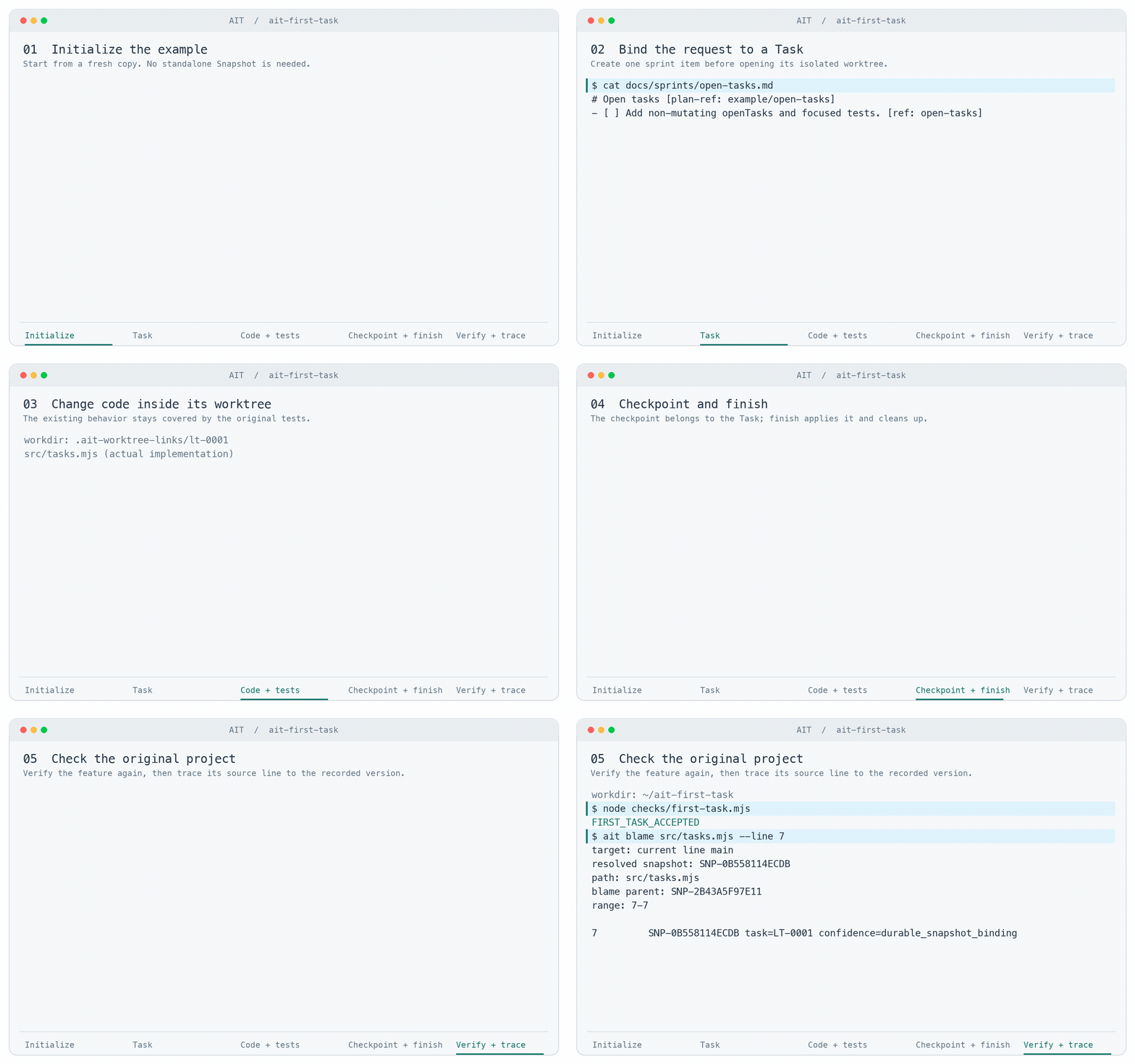
Sprint card · record the request
Follow an AIT Task
One request. A working change. A finished Task.
Watch AIT open an isolated worktree, verify a small change, and finish it back into the original project.
Read the command transcript
AIT first-task command recording — 2026-09-07
Actual command output. Absolute example roots are shortened to ~/ait-first-task.
The replay is edited for readability; playback is not an execution-time measurement.

Working directory: ~/ait-first-task
$ ait --version
ait 1.1.2
Exit code: 0

Working directory: ~/ait-first-task
$ node --test tests/baseline.test.mjs
✔ task titles preserve the input order and data (1.168458ms)
✔ the existing board title is unchanged (0.063583ms)
✔ the existing priorities are unchanged (0.046333ms)
ℹ tests 3
ℹ suites 0
ℹ pass 3
ℹ fail 0
ℹ cancelled 0
ℹ skipped 0
ℹ todo 0
ℹ duration_ms 63.568458
Exit code: 0

Working directory: ~/ait-first-task
$ ait init
Initialized empty AIT repository in ~/ait-first-task/.ait (plan=zh-Hant-TW/concise)
Exit code: 0

Working directory: ~/ait-first-task
$ ait config set --user-name 'AIT Demo'
ait config set
user-name: AIT Demo
Exit code: 0

Working directory: ~/ait-first-task
$ cat docs/sprints/open-tasks.md
# Open tasks [plan-ref: example/open-tasks]

## Intent
Add openTasks(tasks) to src/tasks.mjs. Return a new array of tasks whose done property is not true, preserving order and object references without mutating the input. Keep taskTitles unchanged.

## Constraints
Only edit this Task worktree. Do not edit checks/, remove tests, or add packages. The root agent executes this task without subagents.

## Acceptance
Add a focused regression test for done true, false, missing, empty input, preserved order and identity. Run node --test tests/*.test.mjs and node checks/first-task.mjs before Task finish; verify acceptance again in the original directory afterward.

- [ ] Add non-mutating openTasks and focused tests. [ref: open-tasks]
Exit code: 0

Working directory: ~/ait-first-task
$ ait task start --from 'docs/sprints/open-tasks.md#open-tasks' --intent 'Add openTasks without mutating input'
ait task start
task: LT-0001
title: Add non-mutating openTasks and focused tests
next: cd ~/ait-first-task/.ait-worktree-links/lt-0001
Exit code: 0

Working directory: ~/ait-first-task/.ait-worktree-links/lt-0001
$ node --test tests/baseline.test.mjs tests/open-tasks.test.mjs
✔ task titles preserve the input order and data (1.041042ms)
✔ the existing board title is unchanged (0.053041ms)
✔ the existing priorities are unchanged (0.048583ms)
✔ openTasks returns unfinished tasks without changing input or objects (1.224417ms)
ℹ tests 4
ℹ suites 0
ℹ pass 4
ℹ fail 0
ℹ cancelled 0
ℹ skipped 0
ℹ todo 0
ℹ duration_ms 63.11
Exit code: 0

Working directory: ~/ait-first-task/.ait-worktree-links/lt-0001
$ node checks/first-task.mjs
FIRST_TASK_ACCEPTED
Exit code: 0

Working directory: ~/ait-first-task/.ait-worktree-links/lt-0001
$ ait snapshot create LT-0001 --message 'Add non-mutating openTasks'
ait snapshot create
snapshot_id: SNP-0B558114ECDB
task_id: LT-0001
line_name: feature/lt-0001
parent_snapshot_id: SNP-2B43A5F97E11
message: Add non-mutating openTasks
Exit code: 0

Working directory: ~/ait-first-task/.ait-worktree-links/lt-0001
$ ait task finish LT-0001 --local
finished: LT-0001 -> main @ SNP-0B558114ECDB
closed: task, worktree, line, sprint
title: Add non-mutating openTasks and focused tests
Exit code: 0

Working directory: ~/ait-first-task
$ node --test tests/baseline.test.mjs tests/open-tasks.test.mjs
✔ task titles preserve the input order and data (0.987959ms)
✔ the existing board title is unchanged (0.050417ms)
✔ the existing priorities are unchanged (0.042292ms)
✔ openTasks returns unfinished tasks without changing input or objects (0.963875ms)
ℹ tests 4
ℹ suites 0
ℹ pass 4
ℹ fail 0
ℹ cancelled 0
ℹ skipped 0
ℹ todo 0
ℹ duration_ms 61.445542
Exit code: 0

Working directory: ~/ait-first-task
$ node checks/first-task.mjs
FIRST_TASK_ACCEPTED
Exit code: 0

Working directory: ~/ait-first-task
$ ait blame src/tasks.mjs --line 7
target: current line main
resolved snapshot: SNP-0B558114ECDB
path: src/tasks.mjs
blame parent: SNP-2B43A5F97E11
range: 7-7

7         SNP-0B558114ECDB task=LT-0001 confidence=durable_snapshot_binding
Exit code: 0

Implementation recorded in the completed Task:
// Small, existing behavior to preserve while adding your first feature.
export function taskTitles(tasks) {
  return tasks.map((task) => task.title);
}

export function openTasks(tasks) {
  return tasks.filter((task) => task.done !== true);
}

Bound sprint after Task finish:
# Open tasks [plan-ref: example/open-tasks]

## Intent
Add openTasks(tasks) to src/tasks.mjs. Return a new array of tasks whose done property is not true, preserving order and object references without mutating the input. Keep taskTitles unchanged.

## Constraints
Only edit this Task worktree. Do not edit checks/, remove tests, or add packages. The root agent executes this task without subagents.

## Acceptance
Add a focused regression test for done true, false, missing, empty input, preserved order and identity. Run node --test tests/*.test.mjs and node checks/first-task.mjs before Task finish; verify acceptance again in the original directory afterward.

- [x] Add non-mutating openTasks and focused tests. [ref: open-tasks]
Illustrated workflow · no live agent or AIT process runs in this page. Choose a step to read at your own pace.
Read the complete walkthrough
Three Tasks in parallel
Run these three scoped requests in separate Tasks. Preserve the login API and existing behavior. If their changes overlap, show the conflict and let me review it.
Three requests with clear boundaries
Record the outcome and acceptance checks for each card before starting its Task.
- Card 01 · Password control · Scope and checks recorded
- Card 02 · Session validator · Scope and checks recorded
- Card 03 · Auth config rename · Scope and checks recorded
One writable worktree per Task
Each Task receives its own worktree. The agent must work inside the returned edit_root.
- Card 01 · Password control · Agent A · worktree 1
- Card 02 · Session validator · Agent B · worktree 2
- Card 03 · Auth config rename · Agent C · worktree 3
Checks follow the changed revision
Finish Card 01 first. Card 02 updates to the newer target and checks the integrated result. Card 03 overlaps the same configuration change incompatibly.
- Card 01 · Password control · Checks pass · ready to finish
- Card 02 · Session validator · Target advanced · clean rebase · recheck
- Card 03 · Auth config rename · Incompatible edit overlaps Card 02
Two Tasks finish; the conflict remains visible
The compatible work completes. Card 03 stops with its work preserved for a repair and another review. A clean rebase alone does not establish semantic correctness.
- Card 01 · Password control · FINISHED · worktree cleaned
- Card 02 · Session validator · REBASED → FINISHED · worktree cleaned
- Card 03 · Auth config rename · CONFLICT · unfinished work retained
Two completed Tasks · one explicit conflict to resolve · no hidden overwrite
One Task
You: Add a Show password button. Preserve the login API and keyboard behavior, and add the relevant tests.
-
Record the request
Agent: I’ll carry that request through one sprint-bound Task and finish the verified result locally.
docs/sprints/password_visibility.md # Password Visibility [plan-ref: login/password-visibility/root] - [ ] Add the accessible control and focused tests. [ref: login/password-visibility/implement] -
Start the Task
Agent: The sprint item is ready. I’m starting its Task and moving into the isolated worktree.
$ ait task start --from docs/sprints/password_visibility.md#login/password-visibility/implement --intent "Add accessible password visibility control" task: LT-0042 next: cd .ait-worktree-links/lt-0042 $ cd .ait-worktree-links/lt-0042 working tree: LT-0042 -
Change and verify
Agent: I’m changing only the login form and its focused tests inside the Task worktree.
src/LoginForm.tsx
+ <button type="button" aria-pressed={visible}>
+   {visible ? "Hide password" : "Show password"}
+ </button>

tests/LoginForm.test.tsx
+ toggles password visibility with keyboard and pointer input

$ npm test -- LoginForm
3 tests passed
Agent: The focused checks passed. I’m recording this exact revision before closeout.
$ ait snapshot create --message "Add accessible password visibility control" Snapshot: SNP-7E21A4C8 -
Complete the Task
Agent: The verified Snapshot is ready. I’m finishing the Task onto the local target line.
$ ait task finish LT-0042 --local
Status: completed
Target: main (local)
Task: completed
Sprint item: completed
Worktree: cleaned
Agent: Done. The password control and focused tests were completed locally; the Task and exact sprint item are complete.
Result: Change complete → Task closed → sprint item closed → worktree cleaned
Confirm regression
You: Password visibility stopped working from the keyboard after the last login-form change. Confirm the regression and fix it without changing login submission.
-
Reproduce the failure
Agent: I’ll reproduce the reported behavior and trace the responsible Snapshot before choosing the repair.
$ npm test -- LoginForm 1 failed: activates password visibility with Space -
Trace the responsible Snapshot
Agent: The focused test fails on the keyboard path. I’m checking the changed source line now.
$ ait blame src/LoginForm.tsx --line 84 resolved snapshot: SNP-5C91D2B4 path: src/LoginForm.tsx 84 SNP-5C91D2B4 · Refactor login form actions -
Bind and repair
Agent: Regression confirmed at SNP-5C91D2B4. I’ll bind the repair and its regression test to one exact sprint item.
docs/sprints/password_keyboard_regression.md
# Password Keyboard Regression [plan-ref: login/password-keyboard-regression/root]
- [ ] Restore native keyboard activation and lock it with a regression test. [ref: login/password-keyboard-regression/repair]

$ ait task start --from docs/sprints/password_keyboard_regression.md#login/password-keyboard-regression/repair --intent "Restore password-control keyboard activation"
task: LT-0043
next: cd .ait-worktree-links/lt-0043

$ cd .ait-worktree-links/lt-0043
working tree: LT-0043
Agent: I’m restoring native button semantics and keeping the failing keyboard case as the regression test.
src/LoginForm.tsx
- <span role="button" onClick={toggleVisibility}>
+ <button type="button" onClick={toggleVisibility}>

tests/LoginForm.test.tsx
+ activates password visibility with Space

$ npm test -- LoginForm
4 tests passed
Agent: The original failure now passes with the existing login behavior intact. I’m recording the repaired revision.
$ ait snapshot create --message "Restore password-control keyboard activation" Snapshot: SNP-9B42C1E6 -
Complete the repair
Agent: The regression repair is verified. I’m finishing the Task onto the local target line.
$ ait task finish LT-0043 --local
Status: completed
Target: main (local)
Task: completed
Sprint item: completed
Worktree: cleaned
Agent: Confirmed and fixed. Keyboard activation is covered by the regression test, and the repair completed locally.
Result: Regression repair complete → Task closed → sprint item closed → worktree cleaned
What happens when several Tasks run at once?
Each Task keeps its own intent, worktree and checks. Compatible work can finish; a conflicting change stops with its work retained. Recorded versions make later investigation possible.